


Digital Calendar
Digital Calendar
Regular price
$179.00
Sale price
$179.00
Regular price
$239.00
Unit price
per
The digital calendar and photo frame in one! Your plans and your favourite people, together on the wall.
10.1"
Black Wood
Couldn't load pickup availability
Digital calendar & photo frame in one
Meet the LuvLink Digital Calendar — a beautiful frame that shows your family's real schedule and your favourite photos, together on the wall. It syncs the calendars you already use, so one glance replaces the endless "Mum, when's soccer?" A photo frame when you want it. A calendar when you need it.
Why families love it
-
Auto-syncs your real calendar 📅
Google, Apple/iCloud, Outlook & Yahoo, updated in real time over Wi-Fi. -
One shared family calendar🏡
Everyone sees the week at a glance; fewer clashes and forgotten pickups. -
Best of both worlds 🖼️
Hybrid view shows your photos and your plans side by side. -
Countdowns & reminders 🔔
For birthdays, holidays and trips. -
Colour-code your calendars 🎨
So everyone's plans are easy to tell apart. -
Aussie-owned 🇦🇺
Local stock & support, with a 12-month warranty.

Powered by Frameo
The LuvLink Digital Calendar runs on Frameo — the world's most popular digital frame software, featured in Forbes, TechRadar and People. Set up in minutes with the free app (iPhone & Android), enjoy up to 32GB storage, support for 22+ languages, offline mode and full GDPR & CCPA privacy. No social media, no account and no subscription needed to get started — just plug in, sync and go.
Available in 10.1", 15.6" and 21.5" and a range of styles, with fast free shipping from Sydney and a 30-day money-back guarantee.
Specifications
Specifications
10.1" Digital Frame
- Resolution: 1280 x 800, 16:10
- Storage: 32GB
- Ports: Micro SD, USB-C power · Wi-Fi & speakers
15.6" Digital Frame
- Resolution: 1920 x 1080 Full HD, 16:9
- Storage: 32GB · Weight: 1.2kg · Wall-mountable
21.5" Digital Frame
- Resolution: 1920 x 1080 Full HD, 16:9
- Storage: 32GB · Wall-mountable
Calendar: syncs Google, Apple, Outlook & Yahoo · 4-day, week, month & hybrid views · powered by the free Frameo app · no subscription to start.
Warranty
Warranty
All LuvLink Digital Photo Frames come with a 12-month warranty & 30-day money back guarantee.
Our dedicated Australian support team is here to help you at any time.
Shipping & Returns
Shipping & Returns
Fast & free delivery within Australia of 2-4 days. We also ship worldwide.
We offer a satisfaction 30-day money back guarantee for all LuvLink products.


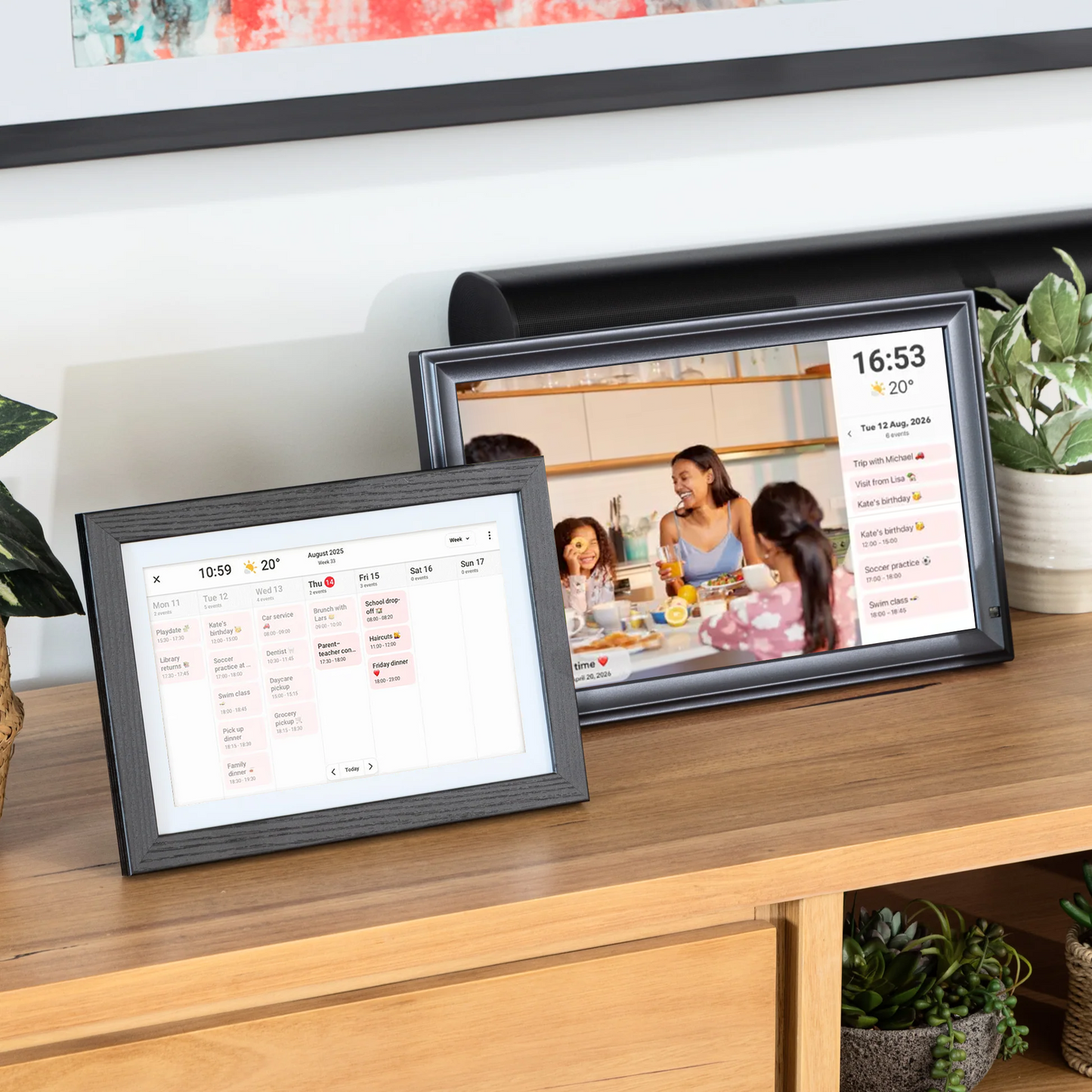


✨ NEW — NOW WITH CALENDAR
Digital Photo Frame and Calendar
Your LuvLink frame now syncs with your favourite calendar — while still being a beautiful digital photo frame. Your family's plans and your favourite people, together on one screen.

ONE GLANCE. THE WHOLE WEEK.
Australia's Favourite Digital Calendar
The LuvLink Digital Calendar puts your family's real schedule and your favourite photos on the wall — together. It syncs the calendars you already use and updates the moment plans change, so everyone's on the same page. A photo frame when you want it, a calendar when you need it.
Trusted by families. Powered by Frameo.
📅
Your real calendar, on the wallAuto-syncs Google, Apple, Outlook & Yahoo over Wi-Fi and updates in real time, so the whole family sees the week at a glance.
🏡
One shared family calendarEveryone's plans in one place the whole house walks past. Kids and grandparents can check it themselves
🖼️
Photos and plans, togetherHybrid view keeps your favourite memories sliding by right alongside today's schedule. Beautiful and useful at once.
🔔
Never miss the moments that matterCountdowns for birthdays, holidays and trips mean the big days are always in view.
🔄
Change a plan, it's on the frameEdit an event on your phone and the wall updates instantly. No re-typing, no reminders, no nagging.
👵
Simple for every ageA big, clear display and effortless setup. If they can read a wall calendar, they can use this.

SEE YOUR WEEK, YOUR WAY
Choose your view
Five ways to see your day — from the whole month at a glance to your photos and plans side by side. Switch anytime with a tap, and it auto-rotates portrait or landscape, on a wall or a bench.
🗓️
Weekly viewPlan the whole week together at a glance.
📅
4-day viewA focused look at the days just ahead.
📆
Monthly viewThe big picture: every event and important date.
🖼️
Hybrid viewYour photos and your plans, side by side on the one screen.
🎞️
Photos-onlyHide the calendar and enjoy a full-screen slideshow.
MORE ABOUT THE CALENDAR
How the Frameo Calendar works
Everything syncs from the calendar you already use — no new app to learn, no double entry.
📥
Events sync automatically
Every event from the calendar you already use appears on the frame and updates in real time. Tap one to see the time, place and notes.
🔄
Auto-rotates
Portrait or landscape, the calendar rotates to suit — with wall-mount and table-stand built in.
🎨
Colour-code events
Give each person or calendar its own colour, so everyone's plans are easy to tell apart at a glance.
LUVLINK DIGITAL CALENDAR
The plans that get lost — now everyone sees them.
A calendar on the wall the whole family walks past.
Less mental load for you. Fewer missed moments for everyone.
📅
Everyday plans
School runs, shifts, appointments — the week's schedule, always in view.
🤝
Everyone in sync
One shared calendar means fewer clashes, double-bookings and forgotten pickups.
🎉
Big moments
Birthdays, holidays and trips counted down so nothing important sneaks up on you.
❤️
And your photos too
In between the plans, your favourite people glow past on the slideshow.
AND A BEAUTIFUL PHOTO FRAME, TOO
More ways to stay close
When it's not showing your week, the LuvLink Digital Calendar is a gorgeous photo frame — sharing life's moments with the people you love, wherever they are.


Calendar built right inSync your calendar and show your week alongside your photos — organised and connected in one frame.
›
Display more with collage modeShow up to 6 photos at once — perfect for sharing more memories in a single glance.
›
React in real timeSend a quick emoji reaction to any photo straight from the frame. A simple 'thinking of you' in seconds.
›
Send photos & videos instantlySend moments straight to the frame from anywhere in the world. Add a message to make it personal.
›
Organise with albumsCreate albums for every occasion and switch between them anytime. Simple and flexible.
›
Features
Everything you need

🔄 Always the perfect view
Auto-rotates portrait or landscape, so your calendar and photos always look their best — on a wall or a bench.

🌈 Bright, vivid display
Crisp IPS screen with wide viewing angles — your week and your memories stay clear and vibrant from across the room.
⚡ Set up in minutes
Sync your calendar and start sharing photos in minutes. Connect once and you're organised.

📶 Powered by Frameo
Runs on Frameo — the world's most popular frame app. Calendar sync and photo sharing, with no subscriptions or ongoing fees, ever.

🇦🇺 Proudly Australian
Local stock with fast dispatch from Australia. Plus reliable worldwide delivery for family overseas.

💛 30-day happiness guarantee
Buy with confidence from LuvLink. Love it or return it within 30 days — no stress.
Customer reviews
Feel confident. Stay connected.
Why Choose the LuvLink® Digital Calendar?
We create meaningful ways to stay connected and organised, backed by trusted quality, local support, and thousands of happy customers across Australia.
⭐
Trusted by 100,000+ families worldwideJoin thousands of Australians sharing moments every day, with over 2,500 five-star reviews.
🇦🇺
Australian-owned with local supportReal people, real help, based right here in Australia when you need it.
🚚
Free & fast local shippingQuick dispatch and reliable delivery Australia-wide, without long waits.
🛡️
Risk-free purchase30-Day Money-Back Guarantee and 12-Month Warranty for complete peace of mind.
🏆
Australia’s favourite connected giftsAward-winning designs trusted for simplicity, reliability, and meaningful connection.
FAQs
Everything you need to know about the LuvLink Digital Calendar. Still have a question? Please get in touch — our Aussie team is happy to help.
Which calendars can I sync?
Which calendars can I sync?
Google, Apple/iCloud, Outlook and Yahoo — plus any calendar with an iCal link. Connect one in the free Frameo app and your events appear on the frame automatically, updating in real time over Wi-Fi.
Can I still see my photos?
Can I still see my photos?
Absolutely — that's the whole idea. Choose hybrid view to show your plans alongside your photo slideshow, or keep it a full photo frame with the calendar just a tap away.
Are there any ongoing costs?
Are there any ongoing costs?
No — your frame, photo sharing and your first synced calendar work with no subscriptions or accounts. Frameo Premium is an optional upgrade if you'd like extras like multiple calendars and countdowns.
Is it hard to set up?
Is it hard to set up?
Not at all. Sync your calendar in the app, tap 'Allow' on the frame, and you're done in minutes. From then on it keeps itself up to date automatically.
How does the family see the calendar?
How does the family see the calendar?
Just by looking! Once it's synced, anyone can glance at the frame to see the week — no app or account needed to view it. Only the person managing events needs the free Frameo app.
Can I use it landscape or portrait?
Can I use it landscape or portrait?
Yes — place it either way and the display adjusts to suit. It's also wall-mountable, perfect for a hallway, kitchen or entryway.
Does Frameo see my calendar or schedule?
Does Frameo see my calendar or schedule?
No. Frameo is built around 'Privacy by Design' — it doesn't store your calendar details or your private moments. Your schedule stays yours.
How much storage does it have?
How much storage does it have?
A huge 32GB built in — room for thousands of photos and videos alongside your calendar. You can also back up to an SD card.
How do I set up the calendar?
How do I set up the calendar?
In the free Frameo app choose your provider (Google, Apple, Outlook or Yahoo) — or scan the QR code on the frame — then tap 'Allow' on the frame. It syncs automatically from then on, usually in under two minutes.
Can more than one person add events?
Can more than one person add events?
Yes. Anyone who shares the calendar you've synced can add or change events from their own phone, and the frame updates in real time. Frameo Premium also lets you combine several calendars into one view.
Does it need Wi-Fi?
Does it need Wi-Fi?
For live calendar updates, yes — it syncs over Wi-Fi. Your photos still display offline, and the frame keeps showing the last synced events until it reconnects.
Can I wall-mount it?
Can I wall-mount it?
Absolutely — it looks great on a wall in a hallway, kitchen or entryway, or freestanding on a bench, in portrait or landscape.
What's the difference between this and the photo frame?
What's the difference between this and the photo frame?
It's the same beautiful frame — this one leads with the calendar. It shows your synced schedule (and your photos in hybrid view); our Digital Photo Frame leads with the slideshow. Both run on Frameo.
Can I colour-code the calendar?
Can I colour-code the calendar?
Yes — give each person or calendar its own colour so it's easy to tell whose event is whose at a single glance.
Does it run on batteries?
Does it run on batteries?
No — it runs on mains power via the included USB-C adapter, so it's always on and always up to date. There are no batteries to change.
Can I show reminders, chores or to-dos?
Can I show reminders, chores or to-dos?
Anything in your synced calendar appears on the frame — so add reminders, chores or appointments as calendar events and they'll show up automatically alongside everything else.

Proudly Australian
LuvLink® is proud to be 100% Australian owned. Our stock is local and our support team is located right here in Australia! Our mission is to keep you connected with your loved ones!
We are proud to be developing award-winning products that bring people together.
Shop now. Pay later with

Customers also loved
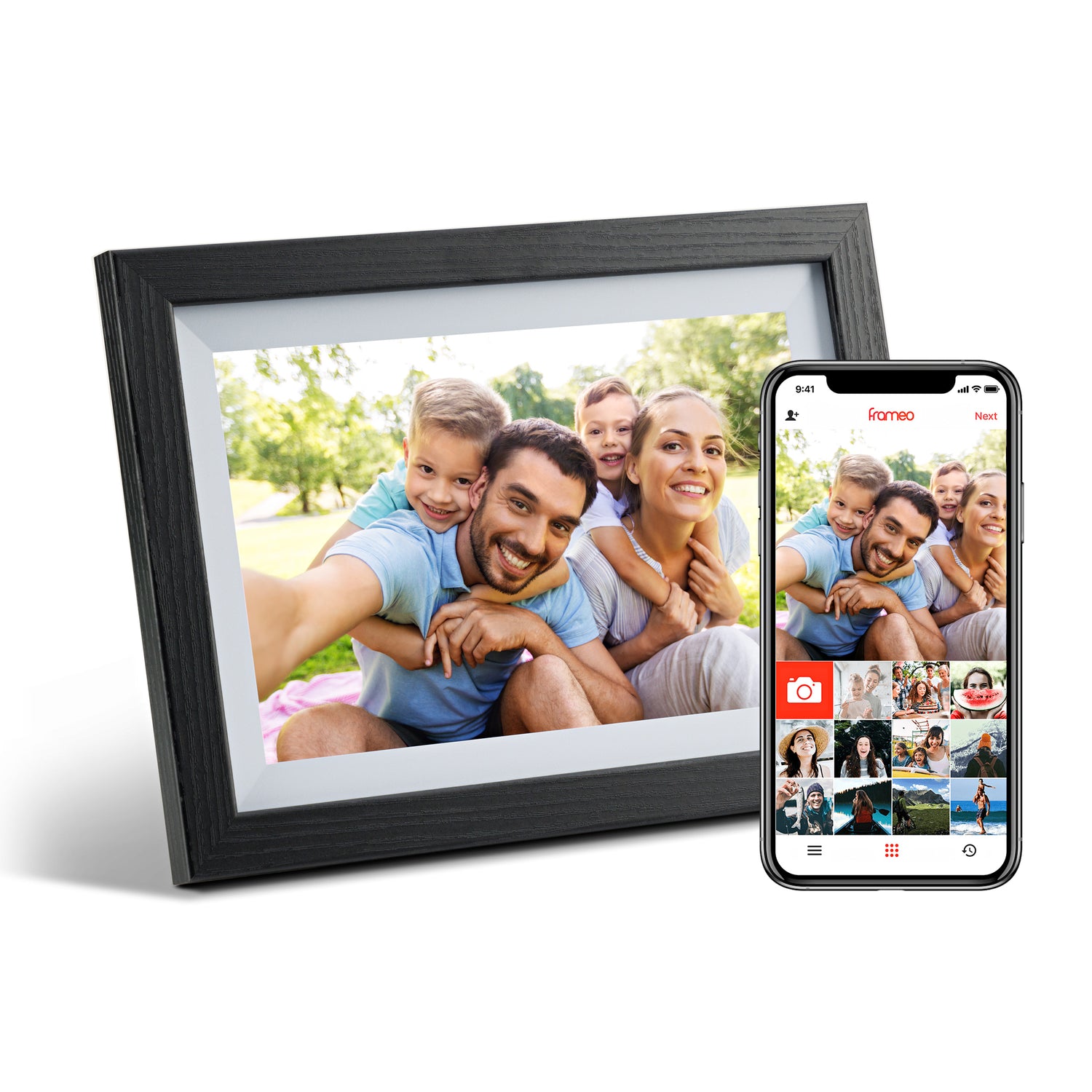
Digital Photo Frame
Regular price
$179.00
Sale price
$179.00
Regular price
$239.00
Unit price
per

Infinity Lamp
Regular price
$164.25
Sale price
$164.25
Regular price
$219.00
Unit price
per

Modern Home Lamp
Regular price
$179.25
Sale price
$179.25
Regular price
$239.00
Unit price
per
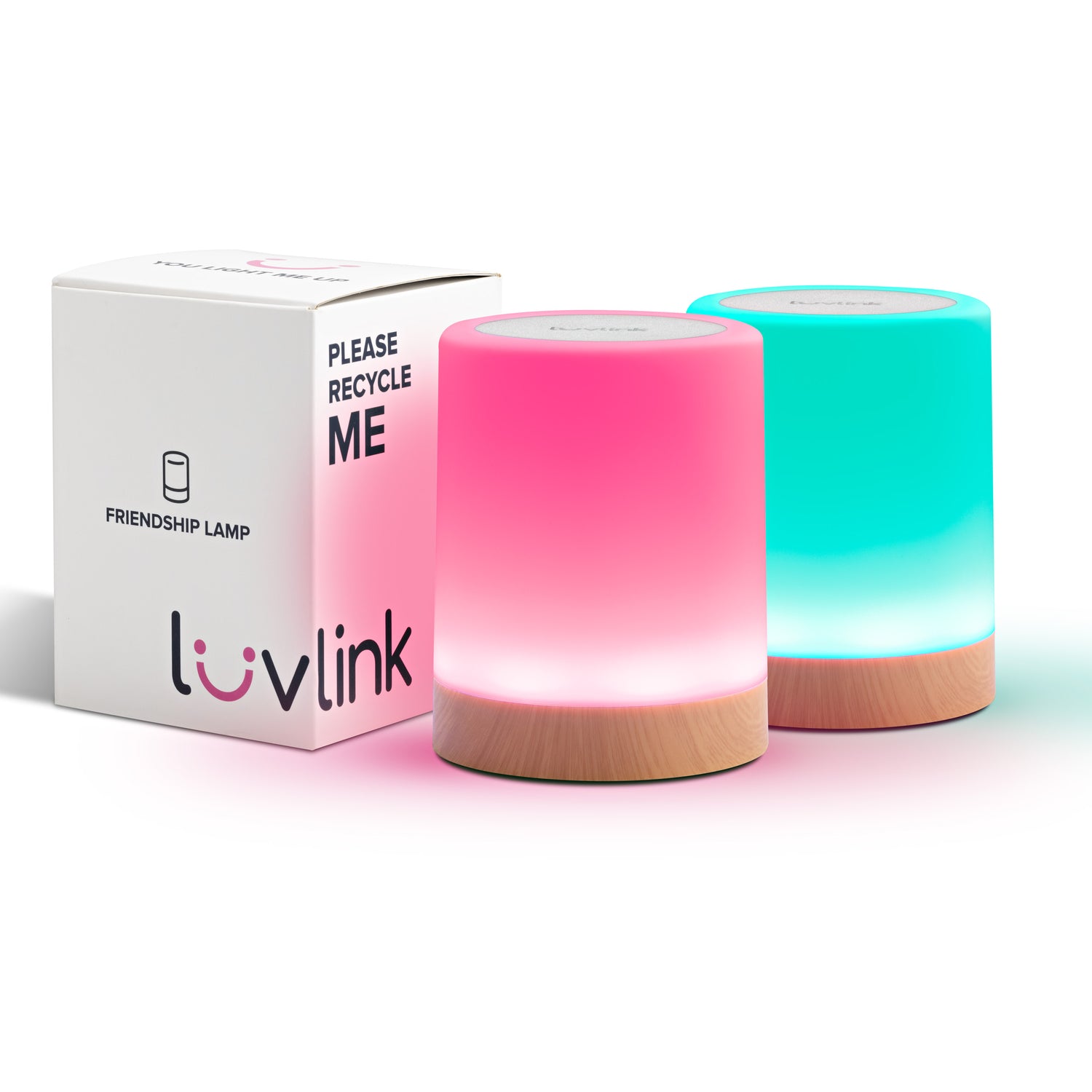
Friendship Lamp
Regular price
$179.00
Sale price
$179.00
Regular price
$239.00
Unit price
per
#luvlink #apartbutneveralone